





You need to install Adobe Acrobat Reader to view invoices:

Electronic invoices can be viewed in:
Sign In using






Ibanka (SEB Banka)
You can connest to the rekini.lv from the internetbank of SEB Banka "Ibanka".
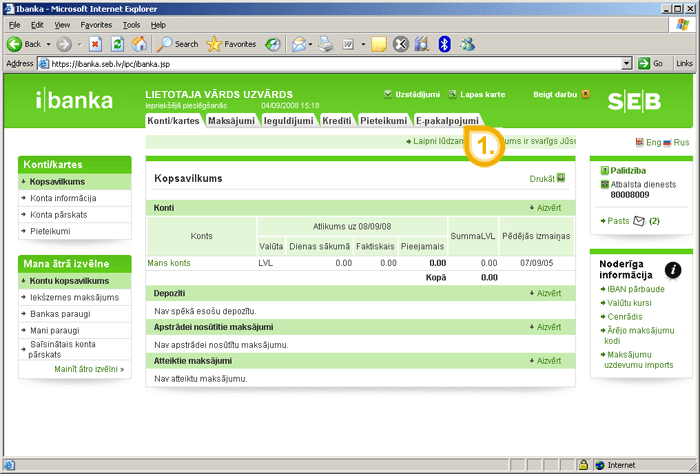
After the authorization in Ibanka you have to choose "E-services" (1) from the functional menu in the upper part of the window.
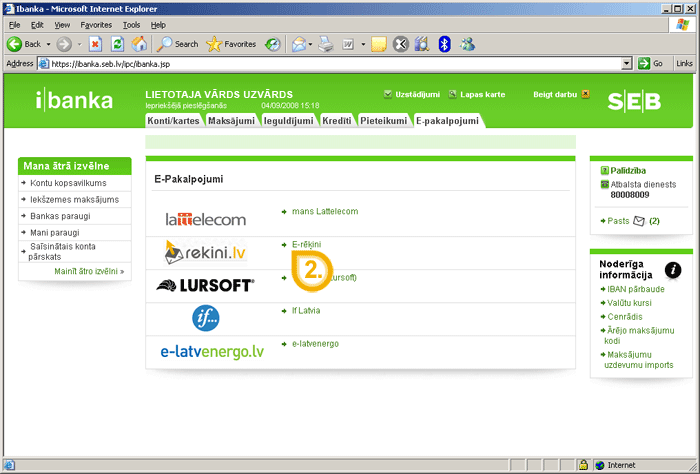
There is a list with providers of e-services in the page "E-services". When you click on rekini.lv "E-bills" (2) you will be redirected to the e-bills page of Ibanka.
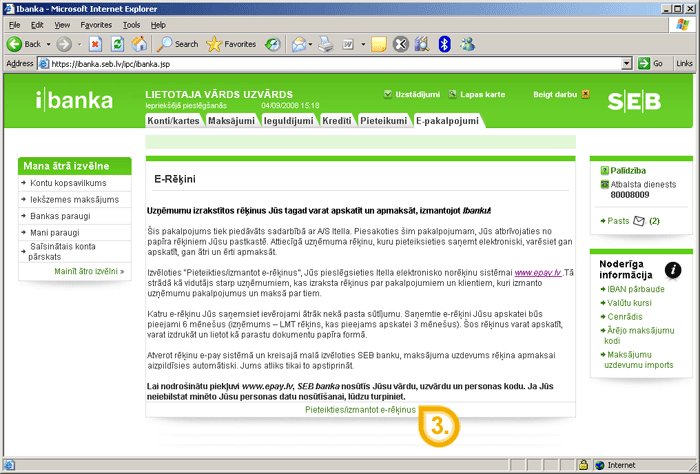
There is a button "Apply / use e-bills" (3) in the page "E-bills" under the description of the service by clicking on what you will be redirected to the web page rekini.lv for:
- reviewing / printing / paying e-bills received;
- filling in new applications;
- changing data of existing applications / canceling of them.
You also will receive notices on the e-mail address about the company prepared new e-invoices.